Wieltra Crane Remote Control Pairing: Step-by-Step Guide with Visual Reference
Having your crane remote control lose its receiver connection — or needing to pair a new Wieltra transmitter to a receiver — during active operations is a stressful situation. However, the Wieltra pairing procedure is simpler than it appears and can be completed in under two minutes without specialist tools. This guide walks through the complete five-step pairing process with clear visual reference, covers the two rules that must be understood to avoid cross-activation on multi-crane sites, and explains what to check if the pairing does not complete successfully.
Get in Touch for All Your Requirements
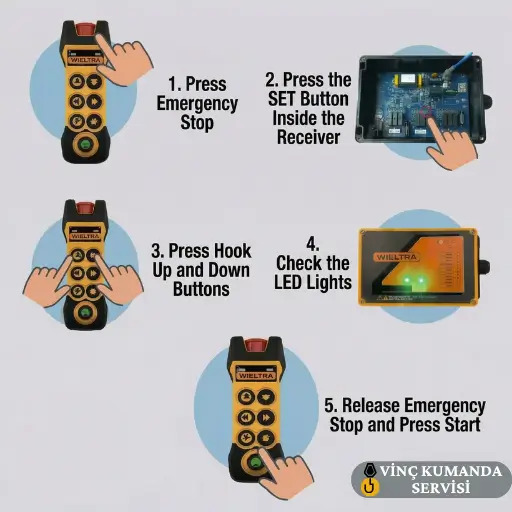
Wieltra Crane Remote Control Pairing Procedure: 5 Steps
Wieltra engineers designed the pairing process to be executable by a crane operator in the field without requiring panel access tools or specialist knowledge. Apply the steps in the exact sequence below — the order is important because step 1 must be completed before any subsequent step is attempted.
Step 1: Ensure Safety Before Starting
Before beginning the pairing procedure, verify the area around the crane is clear and that no load is suspended. Then press the red Emergency Stop (E-Stop) button on the hand transmitter — push it down until it latches in the pressed position. This ensures the system starts in safe mode and prevents any unintended crane motion during the pairing sequence. The E-Stop must be in the latched position throughout steps 2 and 3.
Step 2: Put the Receiver into Identification Mode
Go to the receiver unit — mounted in the crane control panel or externally on the crane body. Open the receiver cover (or locate the identification button on the external surface, depending on the receiver model). Press and hold the identification button. The receiver LEDs will begin flashing — this confirms the receiver has entered identification mode and is ready to accept a new transmitter pairing. Do not leave identification mode before completing step 3, as the receiver will time out and return to normal operation after a short period.
Step 3: Send the Pairing Signal from the Transmitter
With the receiver in identification mode, take the hand transmitter and simultaneously press and hold both the Hook Up and Hook Down buttons. Hold both buttons together — this button combination is the Wieltra-specific pairing signal that tells the receiver “this transmitter is requesting pairing.” Maintain the button combination until you observe the LED response described in step 4. Release the buttons only after the LED confirmation is seen.
Step 4: Confirm Pairing via the Receiver LED Indicators
Keep your eyes on the receiver LED indicators during step 3. When both LEDs on the receiver illuminate simultaneously and remain on (rather than flashing), the pairing has been successfully completed. Consequently, the transmitter and receiver have exchanged their encrypted communication protocol and the system is ready for operation. If the LEDs continue flashing without both illuminating simultaneously, the pairing signal was not received — repeat step 3 without moving away from the receiver.
Step 5: Test the System
After LED confirmation, the system is ready for operation testing. Release the E-Stop button by rotating it clockwise until it springs back to the raised position and clicks. Then press the green Start button (the lowest button on the transmitter panel — also labelled as Horn on some models). If the crane responds to commands, the pairing is confirmed functional. Test at least one hoist direction and one travel direction before returning the crane to service — do not assume all functions are working from a single command response.

Two Rules You Must Know Before Pairing on a Multi-Crane Site
Understanding these two rules before performing the pairing procedure prevents the most common errors on multi-crane sites — specifically, unintended deactivation of a working crane and cross-activation between adjacent cranes.
Rule 1: Single Pairing — One Transmitter, One Receiver
When a Wieltra transmitter is paired to a new receiver, the previous receiver that was stored in the transmitter’s memory is automatically deactivated. Consequently, if you pair a transmitter to a replacement receiver during an emergency, the original receiver — if it is still fitted to a different crane — will no longer respond to that transmitter. This is by design: it prevents one transmitter from activating multiple cranes. However, it means that pairing decisions on multi-crane sites must be made deliberately, not reactively in an emergency.
Rule 2: The Smart Key Architecture — Security by Design
Think of the Wieltra transmitter as a smart key. When you pair it to a new receiver (the new lock), the system automatically stops it from opening the old receiver (the old lock). This architecture is a deliberate safety feature — it ensures that crane remotes on adjacent cranes cannot cross-activate each other, regardless of operating frequency proximity. As a result, the encrypted pairing protocol maintains the operational safety boundary between cranes on the same site without requiring manual frequency separation management.
Wieltra Crane Remote Control Pairing: Video Walkthrough
Watch the step-by-step pairing procedure demonstrated on a live Wieltra system — from E-stop engagement through receiver identification mode to LED confirmation.
Still Having Problems? What to Check Before Calling Service
If the pairing procedure has been followed correctly but the system still does not pair or function after pairing, the fault is likely in the receiver electronics rather than the pairing procedure itself. However, before concluding this, verify the following points in order:
- Transmitter battery: A depleted battery reduces RF transmission power — the pairing signal may not reach the receiver with sufficient strength to complete the handshake. Replace the battery and repeat the procedure before any other diagnosis.
- Operator distance during step 3: The pairing signal must be transmitted from within 3–5 metres of the receiver. If step 3 was performed from the operator’s normal working position — which may be 20–30 metres from the receiver — the signal was likely too weak to complete pairing. Move to within 5 metres and repeat.
- Receiver power supply: Check that the receiver LED illuminates at all when the identification button is pressed. If no LED response is present at step 2, the receiver is not receiving its supply voltage — the fault is in the panel power supply, not in the pairing procedure.
- Receiver identification button: On older Wieltra receiver models, the identification button is located inside the receiver enclosure rather than on the external surface. Confirm the correct button location for the specific receiver model from the product documentation.
If all the above have been verified and the pairing still fails, an electronic fault in the receiver PCB is the most likely cause. For a broader diagnosis framework, see our crane remote control not working first steps guide. For Wieltra-specific repair and spare parts, contact the service team directly.
Frequently Asked Questions
What buttons do I press to send the pairing signal on a Wieltra transmitter?
Press and hold the Hook Up and Hook Down buttons simultaneously while the receiver is in identification mode. Hold both buttons together until both receiver LEDs illuminate at the same time. This combined button press is the Wieltra-specific pairing signal — pressing either button alone will not initiate pairing.
How do I know if the Wieltra pairing was successful?
Both LED indicators on the receiver unit will illuminate simultaneously and remain on — not flashing — when pairing is successfully completed. Flashing LEDs indicate the receiver is still in identification mode and waiting for the pairing signal. If the LEDs stop flashing and go out without both illuminating together, the pairing was not completed and the procedure must be repeated from step 2.
Will pairing a Wieltra transmitter to a new receiver deactivate my old receiver?
Yes. The Wieltra single-pairing rule means that when a transmitter is paired to a new receiver, the previous receiver stored in its memory is automatically deactivated. This is a deliberate safety feature — it prevents one transmitter from controlling multiple cranes. Consequently, if you need to return to the original receiver, you must repeat the pairing procedure with the original receiver in identification mode.
Why is the Wieltra pairing not completing even after following all steps?
The most common cause is transmitter-to-receiver distance during step 3. Move within 3–5 metres of the receiver and repeat the Hook Up + Hook Down button combination. If the receiver does not enter identification mode at step 2 — no LED flashing at all — check the receiver’s supply voltage from the crane panel. If both the receiver LED response and the pairing signal fail to produce any result, an electronic fault in the receiver PCB requires service diagnosis.
Does the E-Stop need to be pressed during the pairing procedure?
Yes — the E-Stop must be latched in the pressed position throughout steps 1 to 4. This prevents any unintended crane motion during the pairing sequence. Release the E-Stop only after the LED pairing confirmation has been seen at step 4 and you are ready to test the system at step 5. Operating the transmitter with the E-Stop released before pairing is confirmed creates an uncontrolled crane motion risk.
Can any Wieltra transmitter be paired to any Wieltra receiver?
Generally yes — within the same Wieltra product series and frequency band. However, transmitters and receivers from different Wieltra product generations or different frequency bands may not be cross-compatible. Confirm the frequency band (433 MHz or 868 MHz) of both the transmitter and receiver before attempting pairing — a transmitter and receiver on different bands will not complete the pairing handshake regardless of how correctly the procedure is followed.
What should I do after pairing if the crane still does not respond to commands?
Confirm the E-Stop has been fully released — the button must spring back to the fully raised position with an audible click. Then press the green Start button and test at least one hoist and one travel command. If the receiver shows the pairing LED confirmation but the crane produces no motion response, the fault is in the receiver output relay wiring to the crane panel — not in the pairing itself. Check the terminal connections between the receiver’s relay outputs and the crane’s motion contactor coil circuits.
How long does the Wieltra receiver remain in identification mode before timing out?
Wieltra receivers typically remain in identification mode for 30–60 seconds after the identification button is pressed — the exact duration varies by model. If step 3 is not completed within this window, the receiver exits identification mode and returns to normal standby. In this case, repeat from step 2. The time-out is a security feature that prevents the receiver from remaining in an unpaired, open state indefinitely.
Contact Vinç Kumanda Servisi
Wieltra crane remote not pairing after following all steps, or need a replacement Wieltra transmitter or receiver? Contact Vinç Kumanda Servisi via WhatsApp at +90 532 546 84 62, email us at info@vinckumandaservisi.com, or visit our contact page. We provide Wieltra repair, spare parts and on-site technical service.