Crane Remote Control Repair: 6 Fault Categories, Causes and Step-by-Step Fixes
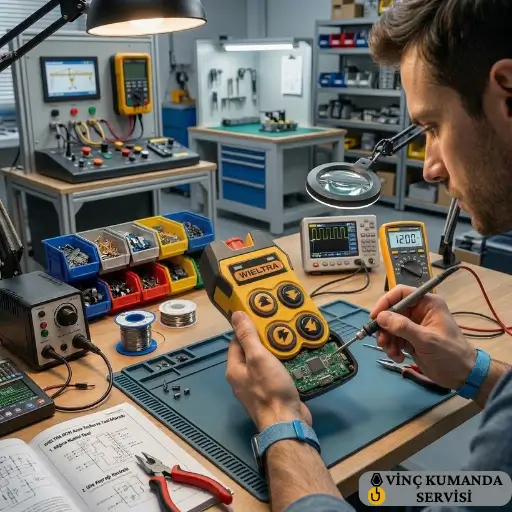
If your crane remote control is not responding, you are almost certainly dealing with one of six fault categories: signal loss, button failure, battery problems, cable damage, software errors, or overheating. Industrial crane remote controls are designed to operate in harsh conditions under CE and IEC 60068 standards — however, incorrect use, deferred maintenance, or environmental factors can produce faults in any of these categories. This guide covers each fault type with its likely causes, the field tests that confirm the diagnosis, and the steps to resolve it — including clear guidance on which faults can be addressed by the operator and which require authorised service.
Get in Touch for All Your Requirements
Fault Reference: All Six Categories at a Glance
The table below provides a quick reference for all six fault categories. Each is covered in detail in the sections that follow.
| Fault Category | Most Common Cause | First Test | Service Required? |
|---|---|---|---|
| Signal Loss | Frequency interference / weak antenna | Change channel, check antenna | Usually operator-resolvable |
| Button Failure | Mechanical wear / dust ingress | Clean, test button sequence | Yes — button replacement may be needed |
| Battery Problem | End of service life / over-discharge | Measure voltage, trial new battery | No — battery replacement sufficient |
| Cable Damage | Entry point fracture | Multimeter continuity test | Yes — full cable replacement required |
| Software Error | Corrupted pairing / outdated firmware | Factory reset, re-pair | Yes — firmware update may be needed |
| Overheating | Short circuit / high ambient heat | Check housing, identify heat source | Yes — circuit inspection required |
1. Signal Loss and Communication Problems
Signal from the crane remote control is not reaching the receiver, or is arriving with a delay. RF crane remote controls operate on 433 MHz or 868 MHz bands — however, other wireless devices on the same site can interfere with these bands. Specifically, Wi-Fi access points, forklift remotes, and industrial wireless equipment all operate in overlapping frequency ranges. As a result, symptoms that appear to be hardware faults are frequently environmental interference problems that can be resolved without any component replacement.
Symptoms: Crane does not respond to commands, responds with delay, or operates intermittently.
Diagnostic Steps and Fixes
- Change the frequency channel: Use the channel selector on the transmitter and receiver to switch to a different sub-channel. Test at the maximum operating distance after the change — not just at close range — before confirming resolution.
- Inspect the receiver antenna: Check that the antenna is firmly tightened, not bent or cracked, and mounted vertically with at least 15 cm clearance from any metal surface. A damaged or incorrectly positioned antenna reduces effective range by up to 40%.
- Check battery voltage: When battery voltage drops below the minimum transmission threshold, signal power falls proportionally. Measure the transmitter battery voltage — below 6V for most industrial systems requires immediate replacement, regardless of the charge indicator reading.
2. Button and Control Failures
A button press does not transmit the command, the button physically fails to return to position, or an incorrect command is triggered repeatedly. Mechanical wear and dust accumulation are the two most common causes. In demanding operating environments, button mechanisms can lose function within 12–18 months if not maintained — however, the failure pattern is typically gradual rather than sudden, which means early detection is possible with regular inspection.
Symptoms: Specific buttons non-functional, button spring not returning, or commands continuously triggered without input.
Diagnostic Steps and Fixes
- Mechanical wear: Buttons that are stuck or non-responsive require replacement. Specifically, source replacement buttons from the original manufacturer — generic substitutes may have different actuation force or travel dimensions that affect the contact reliability.
- Dust and contamination: Clean button housings with dry compressed air. Do not use chemical cleaners or solvents — these can dissolve the button seal material or damage the PCB surface beneath the button assembly.
- Internal contact oxidation: Copper contacts beneath the button mechanism can darken and oxidise, increasing contact resistance until the button stops transmitting reliably. This requires PCB-level inspection by the service team — it is not visible externally and cannot be resolved through surface cleaning.
3. Battery and Charging System Problems
The remote control does not power on, shuts down within minutes of a full charge, or the charge indicator drops irregularly. Industrial crane remote batteries are typically 7.2V or 9.6V NiMH or Li-ion packs with a service life of approximately 2–3 years. However, heat exposure, over-discharge, or incompatible charging equipment can permanently damage a battery well before the end of its nominal service life.
Symptoms: Remote does not power on, shuts down during operation, charge indicator behaves erratically.
Diagnostic Steps and Fixes
- Battery replacement: Use original or manufacturer-approved battery packs only. Incompatible batteries — even if physically similar in size and nominal voltage — can have different discharge curves that confuse the charge management circuit, leading to either under-charging or overcharging.
- Charger output verification: Measure the charger’s output voltage with a multimeter. If the reading deviates from the rated label value by more than 10%, replace the charger. A charger delivering above-rated voltage over-charges and damages the battery pack — often without producing any visible symptom until the battery fails completely.
- Storage conditions: Do not store batteries in a fully charged or fully depleted state for extended periods. Specifically, 40–60% charge level at storage temperatures between 15–25°C extends service life significantly. Avoid storing in direct sunlight or near heat sources such as crane panels or drive enclosures.
4. Cable Damage and Connection Problems
In wired pendant systems, the connection drops when the cable is in motion, or specific commands are not transmitted. A cable that is continuously tensioned during crane travel — particularly at the point where it enters the pendant housing — fatigues and fractures internally while remaining visually intact externally. Furthermore, a cable with an internal conductor break may still transmit some functions while others fail, making the fault appear to be a multi-location problem rather than a single cable fault.
Symptoms: Connection drops when cable is flexed, specific crane motions not transmitted, connection restores when cable is held in a specific position.
Diagnostic Steps and Fixes
- Entry point inspection: Examine the cable at every point where it enters a housing — the pendant enclosure, intermediate strain reliefs, and the crane panel connection. Look specifically for whitening, stiffening, surface cracking, or visible kinking of the outer sheath at these points. These are the locations where internal conductor fracture most commonly originates.
- Continuity test with multimeter: Test each conductor individually from end to end using the continuity function. A break in any conductor is unambiguously identified — this test takes less than five minutes and conclusively localises the fault to the cable rather than requiring panel inspection.
- Connector and termination check: Inspect all connectors for corrosion on the contact pins, loose pin retention in the connector body, or contamination in the mating face. Clean corroded contacts and re-seat or replace loose pins before concluding the cable itself is the fault source.
5. Software and Programming Errors
The remote control is physically functional but commands produce unexpected responses, or certain commands are not transmitted at all. Software faults in crane remote controls fall into two categories: corrupted transmitter-receiver pairing data, and outdated or partially updated receiver firmware. Both produce symptoms that mimic hardware faults — which is why firmware and pairing status must be verified before any component is replaced.
Symptoms: Wrong commands transmitted, remote cannot enter pairing mode, or receiver does not respond to every signal reliably.
Diagnostic Steps and Fixes
- Re-pairing procedure: Reset both transmitter and receiver to factory defaults, then complete the pairing procedure from the beginning using the manufacturer’s current documentation. Specifically, ensure no other wireless systems on the site are active during the pairing sequence — an active adjacent system can interfere with the pairing handshake and produce an incomplete pairing that appears to work at close range but fails at distance.
- Firmware update: Check the receiver card firmware version against the manufacturer’s current release. Outdated firmware is a particularly common cause of incorrect command mapping — where a button triggers a different function than intended — because the command assignment table in the firmware has been updated but the receiver is still running the old version. Contact the manufacturer’s technical support for the current firmware file.
- Diagnostic equipment: Complex programming faults — where the symptom does not correlate clearly with any single parameter — require specialist diagnostic equipment to isolate. For the instruments used in this level of diagnosis, see our crane remote control fault diagnosis equipment guide.
6. Overheating Problems
The remote control housing becomes abnormally warm during use, and the unit shuts down automatically after a period of operation. Industrial crane remote controls are designed to operate within the –20°C to +55°C range per IEC 60068. However, exceeding this range — either from environmental exposure or an internal short circuit — produces thermal shutdown that will recur every time the unit reaches the same temperature threshold.
Symptoms: Housing abnormally warm to touch, unit shuts down automatically after operating for a period, shutdown recurs after cooling and restart.
Diagnostic Steps and Fixes
- Operational rest periods: In intensive operations, allow the remote control a 10–15 minute rest period after every 2–3 hours of active use. This is particularly relevant in outdoor summer environments or near radiant heat sources. However, if the unit overheats during a normal single-shift period without unusual heat exposure, the cause is internal — not operational — and rest periods are a mitigation, not a fix.
- Environmental heat source removal: Do not leave the remote in direct sunlight during rest periods, or store it near radiant heat sources such as furnace doors, casting moulds, or drive enclosures. Specifically, prolonged storage at temperatures above the rated maximum degrades battery chemistry and accelerates capacitor aging — both of which can eventually produce the overheating symptom even in normal operating temperatures.
- Internal short circuit inspection: If overheating recurs despite normal environmental conditions and adequate rest periods, an internal short circuit is the most likely cause. Do not open the housing yourself — disassembling the unit voids the warranty and CE certification. Instead, submit the unit to the authorised service team for thermal inspection, which can be performed non-invasively with a thermal camera before any disassembly.
Conclusion: Which Step Do You Take Next?
Signal loss, battery problems, and button surface cleaning can be addressed by the operator or maintenance team without specialist tools. However, cable replacement, software faults requiring firmware update, button contact oxidation, and overheating from internal short circuits all require authorised service — because incorrect intervention at these fault types either fails to resolve the underlying cause or introduces new faults. In practice, the clearest indicator of which category applies is whether the first-response steps described above resolve the fault completely. If they do not, the fault has a deeper cause that requires professional diagnosis. For the complete repair and technical service offering, see our crane remote control repair and technical service page.
Frequently Asked Questions
Why does a crane remote control suddenly stop working?
The two most common causes of sudden non-response are battery sudden discharge and transmitter-receiver pairing corruption. As a first step, fully charge the battery and retry the pairing procedure. If neither resolves the fault, check whether the receiver’s power LED is illuminated — if it is not, the fault is in the crane panel power supply, not in the remote control. Persistent non-response after these checks indicates a receiver PCB fault requiring service.
What should I do if the crane remote control works intermittently?
Intermittent operation has two primary causes — frequency interference and cable or antenna connection problems. For wireless systems, change the operating channel and inspect the receiver antenna for damage or inadequate clearance from metal surfaces. For wired pendants, test cable continuity at entry points with a multimeter — intermittent connection that restores when the cable is held in a specific position indicates an internal conductor fracture at that location.
Can I repair a crane remote control myself?
Battery replacement and external cleaning are operator-level tasks that do not affect the product’s CE certification. Button replacement, cable repair, and PCB-level intervention require technical knowledge and the correct tools — incorrect work at these levels voids the warranty and can introduce new faults. Specifically, opening the remote control housing without authorisation removes the IP ingress protection even if the housing is reassembled — because the seals cannot be reliably re-set without factory-grade equipment.
How long does crane remote control repair typically take?
Surface faults — battery, button, and antenna — are typically repaired on the same day or the following business day. PCB replacement or firmware update procedures take 2–5 business days. For specialist models requiring sourced spare parts, lead times can extend further depending on parts availability. In all cases, providing the brand name, model number, and a clear symptom description when contacting the service team shortens the diagnosis time and consequently the total repair time.
How can I prevent crane remote control faults?
Monthly inspection of antenna connections, button surfaces, and housing integrity prevents the majority of faults from reaching failure stage. Charge the battery before it reaches fully depleted state — repeated deep discharge is the primary cause of premature battery capacity loss. Store the remote away from dust and moisture when not in use. Additionally, annual authorised service inspection — including E-stop circuit verification and insulation resistance measurement — consistently identifies developing faults before they produce operational failures.
Is it worth repairing an old crane remote control, or should I replace it?
This depends on the nature of the fault, the unit’s age relative to its design life, and spare parts availability. Surface-level faults on a unit within its service life are almost always worth repairing. However, when a PCB replacement cost approaches the price of a new unit, or when the model is no longer supported with spare parts, replacement becomes the more cost-effective choice. An authorised service assessment will identify which option applies — and reputable service teams will recommend replacement when it is genuinely the better value, not only when repair is possible.
What causes a crane remote control to trigger wrong commands?
Incorrect command execution has three common causes. First, metal dust bridging adjacent button contacts — particularly in foundry or grinding environments — causes one button press to trigger multiple contacts simultaneously. Second, firmware command mapping corruption — where the firmware associates button inputs with incorrect output commands. Third, receiver output relay faults — where a relay that should de-energise remains partially energised, producing a slow-release condition that extends the commanded motion beyond the button press duration. Each requires a different fix, so correct identification of which applies is essential.
Contact Vinç Kumanda Servisi
Experiencing a crane remote control fault that you have not been able to resolve with the steps above? Contact Vinç Kumanda Servisi via WhatsApp at +90 532 546 84 62, email us at info@vinckumandaservisi.com, or visit our contact page — our service team provides same-day diagnosis for most fault types.