Crane Remote Control Not Working? How to Recognise the 5 Most Common Fault Signs
When an overhead crane or bridge crane stops, the production line stops with it. However, determining whether the fault is in the wireless crane remote control or in the crane’s mechanical and electrical system directly affects both repair time and cost. The five symptoms covered in this guide account for the majority of crane remote control faults in industrial operation. Recognising each symptom early — and knowing the correct first-response action — is the difference between a short service call and an extended production stoppage caused by incorrect diagnosis or deferred action.
Get in Touch for All Your Requirements
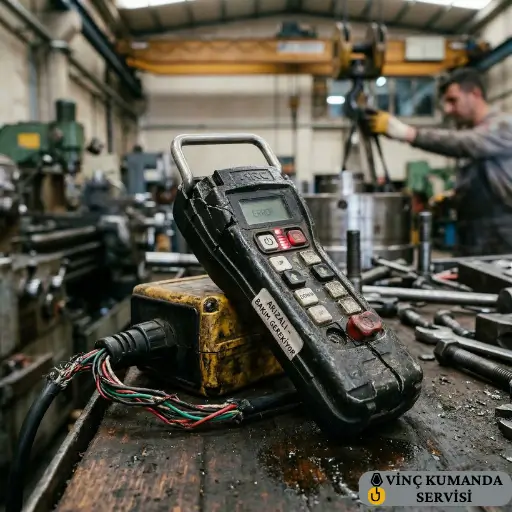
1. The Remote Control Gives No Response at All
Complete non-response — where the crane does not react to any button press — can originate from a flat battery, a pairing loss, a supply voltage problem at the receiver, or a failed receiver PCB. However, the most important principle here is to work through these causes in sequence rather than jumping to the most complex one. In our service experience, the majority of complete non-response calls are resolved at the first two steps of the checklist below — without any component replacement.
First-Response Checklist
- Replace the battery and measure its voltage — a standard alkaline AA cell should read above 1.6V when new. Below 1.4V under load, the cell cannot sustain transmitter output power.
- Clean the battery contact terminals in the battery compartment using fine sandpaper or an eraser. Oxidised contacts increase contact resistance significantly — even a freshly charged battery delivers reduced voltage through a corroded terminal.
- Check whether the PWR LED on the receiver unit is illuminated. If it is not lit, the receiver is not receiving supply power — the fault is in the crane panel power supply, not in the remote control unit.
- Verify whether the transmitter-receiver pairing data has been lost. A pairing reset — where the transmitter and receiver no longer share their unique communication code — produces complete non-response that looks identical to a hardware fault.
2. Commands Execute in the Wrong Direction
A crane that moves down when the up button is pressed, or travels right when left is commanded, is a direct safety incident — not a diagnostic puzzle to be worked through during operation. This symptom must result in immediate cessation of crane use until the fault is diagnosed and rectified. Incorrect command execution typically indicates either a failed output relay in the receiver unit or — in proportional joystick systems — a calibration data corruption or potentiometer mechanical failure.
The Proportional Control Failure Pattern
Joystick remote controls convert joystick deflection angle to an analogue voltage value and transmit this to the receiver. When the potentiometer inside the joystick wears mechanically, the “neutral” position drifts from its calibrated zero point. As a result, the crane continues slow movement after the operator releases the joystick — because the worn potentiometer is still reporting a small non-zero voltage rather than the true neutral value. Consequently, this fault creates a hazardous condition any time a load is suspended.
First-Response Action
Do not attempt to compensate by reversing the commanded direction — this masks the fault and creates confusion for other operators who use the same crane. Take the system out of service, apply the emergency stop lockout, and contact the authorised service team. For relay-type button remotes, the fault is typically a receiver output relay that has stuck or swapped contacts. For proportional joystick remotes, potentiometer replacement and recalibration is the correct repair.
3. Buttons Stick or Response Is Delayed
Physically stuck buttons and delayed command response are two distinct fault types that require different responses — and distinguishing between them is essential for correct diagnosis. Physical sticking is a mechanical fault. Response delay is almost always a signal or communication fault. Treating one as the other leads to incorrect repair attempts and wasted time.
Mechanical Button Sticking
In environments with dust, metal swarf, or chemical contamination, button seals degrade progressively — particularly on remotes with IP ratings below IP65. Contaminants infiltrate the button mechanism, increasing the actuation force required and eventually causing the button to stick in the activated or deactivated position. Furthermore, a button stuck in the activated position sends a continuous command to the crane — which can cause unintended movement even when the operator believes they have released the control.
IP65-rated and above remotes resist this contamination significantly longer. IP67-certified units withstand brief submersion — making them the correct specification for wash-down areas where water pressure cleaning is routine. However, even IP65-rated buttons benefit from regular external cleaning. Specifically, a damp cloth wipe of the button surface weekly removes contaminant accumulation before it reaches the button seal.
Communication-Induced Response Delay
If the button physically operates correctly but the crane response is delayed by more than 100–150 ms, the fault is in the communication path rather than the mechanical button. Signal interference from other wireless devices on the same frequency band is the most common cause. However, low battery voltage can also produce delayed response — as transmitter output power drops, the receiver requires multiple transmission attempts before a clean decode is achieved, adding latency to each command.
For detailed guidance on interference-induced signal problems, see our crane remote control faults troubleshooting guide.
4. Intermittent Signal Loss
Industrial crane remote controls operating on 433 MHz or 868 MHz bands are designed to resist common sources of electromagnetic interference in industrial environments. However, signal loss can still occur — and its causes are more specific than “the wireless is unreliable.” Consequently, the correct approach is to identify which of the known causes applies to the specific installation, rather than treating signal loss as a product defect.
Distance and Structural Obstruction
A remote control that performs reliably at 100 m in open conditions may lose signal at 20–30 m inside a steel-framed building. Metal beams, large machine housings, and reinforced concrete walls reflect and attenuate radio waves — reducing effective range significantly below the nominal datasheet figure. Therefore, the practical planning rule is to specify a remote with nominal range at least 50% above the maximum required operating distance, specifically to allow for the attenuation present in the actual installation environment.
Receiver Antenna Position
Receiver antenna orientation and clearance from metal surfaces directly determines signal reception quality — and is one of the most frequently overlooked causes of signal loss in installations that were initially performing well but have degraded over time. An antenna mounted with its radiating element parallel to a metal surface, or with less than 5 cm clearance from a structural member, can lose 40–60% of its effective gain. In practice, repositioning the antenna costs nothing and is the first physical adjustment to make when signal loss appears on a previously functional installation.
Channel Conflict on Multi-Device Sites
When multiple wireless devices — crane remotes, WiFi access points, other industrial RF equipment — share the same frequency channel in close proximity, signal collisions produce the intermittent command dropouts that operators describe as “the remote cutting out.” Furthermore, this type of interference is particularly difficult to diagnose because it is not constant — it correlates with the activity level of the other devices, which varies throughout the day. Consequently, switching the crane remote to a different channel is the diagnostic test that confirms or rules out this cause.
5. LED Warning Indicators
The LED indicators on the transmitter and receiver units communicate fault conditions through colour and flash pattern. However, the specific codes vary between brands and models — which means that attempting to interpret an LED pattern without the technical manual for the specific unit often leads to incorrect conclusions. Specifically, a red LED that means “emergency stop active” on one brand may mean “receiver-transmitter link lost” on another.
Common LED Pattern Meanings
While the exact codes are brand-specific, the following patterns are consistent across most industrial crane remote control systems as general reference points:
- Red LED — continuous: Emergency stop active. Check whether the E-Stop button on the transmitter is pressed or latched. If the button is released but the LED remains red, the emergency stop circuit in the receiver requires inspection.
- Yellow LED — fast flash: Low battery. Replace the battery immediately — this warning typically allows only 15–30 minutes of remaining operation before shutdown.
- Red LED — slow flash: Receiver-transmitter link lost. The receiver is powered but not receiving the transmitter’s heartbeat signal. Check distance, antenna position, and whether the transmitter is on and has a charged battery.
- Green LED — steady: Normal operation. All systems confirmed operational.
Interpreting Brand-Specific Codes
If the technical manual is not available on site, contact the service team with the brand name, model number, and a description or recording of the LED pattern. In most cases, LED sequences can be interpreted remotely — allowing the service team to determine whether the issue requires immediate on-site attendance or can be resolved with a guided operator action.
Root Causes and Preventive Maintenance
The five fault symptoms above share four underlying root causes: operator handling errors, environmental conditions, mechanical wear, and deferred maintenance. Of these, deferred maintenance is the most straightforward to address — and the one that most consistently prevents the other three from becoming active fault conditions.
Preventive Maintenance Schedule
- Every shift: Battery level check and emergency stop function test before the first lift. These two checks take under 60 seconds and between them catch the two most common causes of in-shift crane stoppages.
- Every 3 months: Clean battery terminal contacts. Inspect button surfaces for contamination ingress. Check IP seal integrity on the housing — any visible crack compromises the ingress protection rating regardless of how small it appears.
- Every 6 months: Inspect receiver unit connections, antenna mounting security, and housing gasket condition. Check receiver antenna clearance from adjacent metal surfaces and reposition if less than 5 cm.
- Annually: Potentiometer wear measurement (joystick systems), safety relay contact resistance test, receiver PCB capacitor inspection, and full safety function verification — all performed by the authorised service team. For the test instruments involved in these checks, see our crane remote control fault diagnosis equipment guide.
Conclusion: Recognise It Early, Act Before It Escalates
Complete non-response, incorrect commands, button sticking, signal loss, and LED warnings: these five symptoms cover the vast majority of crane remote control faults in operation. Recognising each one early — and responding with the correct first action rather than continued operation or random component replacement — consistently reduces repair cost and downtime. Specifically, the difference between a deferred fault and an addressed fault is often the difference between a 30-minute service call and a half-day production stoppage. For professional diagnosis and repair, see our crane remote control repair and technical service page.
Frequently Asked Questions
What should I do first when a crane remote control stops working completely?
Replace the battery and clean the battery terminal contacts in the compartment. Then check whether the receiver’s power LED is illuminated — if it is not, the fault is in the crane panel power supply, not the remote control. If both checks are normal and the remote still does not respond, the transmitter-receiver pairing data may have been lost and needs to be re-established.
Why does a crane remote keep losing signal?
In metal-frame buildings, radio waves reflect and attenuate — effective range inside the building can be 30–40% below the nominal open-area figure. Furthermore, a receiver antenna mounted too close to a metal surface loses significant gain. If the antenna has less than 5 cm clearance from any metal structure, repositioning it is the first action. Frequency channel conflict from other wireless devices on site is also a common cause — switching the operating channel often resolves this immediately.
What should I do if the crane moves in the wrong direction?
Stop the crane and take the remote control out of service immediately — this is a safety fault, not an operational inconvenience. Incorrect command direction indicates a receiver output relay fault or a potentiometer calibration failure in joystick systems. Apply the emergency stop lockout and contact your authorised service team. Do not continue operating the crane with reversed commands, even briefly.
What does a red LED on a crane remote control mean?
Red continuous usually indicates emergency stop active — check that the E-Stop button is fully released and not latched. Red slow-flashing typically means the receiver-transmitter link is lost. However, LED codes are brand and model specific — always match the pattern to the technical manual for the specific unit. If the manual is unavailable, photograph or video the LED pattern before taking any reset action and contact your service team with the brand and model information.
Can I repair a crane remote control fault myself?
Battery replacement, battery terminal cleaning, and external button surface cleaning are operator-level tasks that do not affect the product’s CE certification. However, PCB repair, relay replacement, potentiometer replacement, and firmware calibration require authorised service — because any modification to the safety relay circuits or control electronics must be verified against the original safety assessment to maintain PL-d compliance. An unauthorised repair that passes basic function testing may still have compromised safety relay performance that only becomes apparent under fault conditions.
Why does my crane remote work after a battery change but fail again after a few hours?
This specific pattern — brief recovery after battery change followed by recurrence — almost always indicates battery terminal oxidation rather than battery capacity. The act of inserting a new battery temporarily disrupts the oxidation layer through mechanical contact pressure, restoring adequate conductivity. However, as oxidation rebuilds on the terminal surface, contact resistance increases again and the voltage drop resumes. Cleaning the battery terminals once with fine sandpaper or an eraser resolves this permanently.
Is delayed crane response a remote control fault or a crane electrical fault?
It can be either — and distinguishing between them requires a systematic check. If the delay is consistent across all crane motions, the fault is in the communication path (signal interference or low transmitter power from a weak battery). If the delay is specific to one crane motion axis while others respond normally, the fault is in the crane’s electrical circuit for that axis — typically a slow contactor response or a motor winding issue — not in the remote control system.
Contact Vinç Kumanda Servisi
Experiencing a crane remote control fault that you have not been able to resolve with the first-response actions above? Contact Vinç Kumanda Servisi via WhatsApp at +90 532 546 84 62, email us at info@vinckumandaservisi.com, or visit our contact page — our service team provides remote pre-diagnosis and same-day service planning for most fault types.