Crane Remote Control Interference: 7 Technical Causes and Step-by-Step Solutions
Is your wireless crane remote control cutting out intermittently, responding with delay, or executing commands incorrectly? In most cases, the root cause is not a mechanical or component fault — it is electromagnetic interference, frequency conflict, or signal attenuation in the operating environment. This guide covers the seven most common technical causes of crane remote control interference, the field symptoms that distinguish each cause, and the step-by-step solutions our service team applies in sequence. Understanding the cause before applying a fix is essential — solutions applied without root cause identification produce temporary results at best.
Get in Touch for All Your Requirements
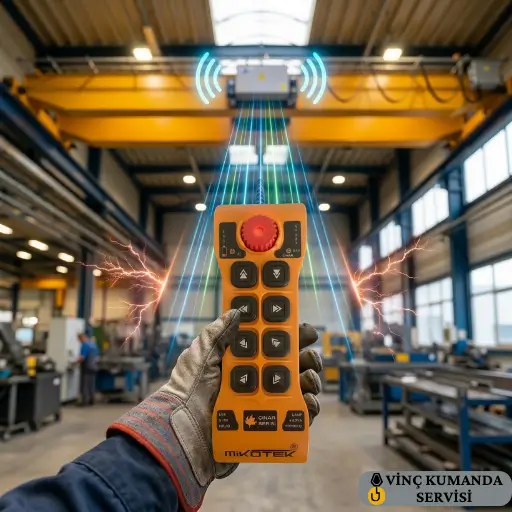
What Is Crane Remote Control Interference?
Wireless crane remote controls operate on the 433 MHz or 868 MHz frequency bands. Interference occurs when another electromagnetic source — operating on the same or an overlapping frequency — disrupts the communication link between the transmitter and the receiver. The result ranges from delayed command response to complete signal loss. However, it is important to note that IP65-rated housing protects the remote control from physical ingress — dust and water. It does not provide any protection against radio frequency interference. Consequently, a physically undamaged remote control can still experience complete signal disruption from an electromagnetic source in the operating environment.
How to Distinguish Interference from a Hardware Fault
The key diagnostic test is positional: move the crane remote control closer to the receiver, or move both to a different area of the facility. If the fault disappears at closer range or in a different location, the cause is environmental — interference or signal attenuation. If the fault persists regardless of position, the cause is in the transmitter, receiver, or cabling. This single test — before any component inspection — separates the two fault categories and determines the correct diagnostic path.
The 7 Technical Causes of Crane Remote Control Interference
The following causes are ordered by frequency of occurrence in field service calls. In most cases, the first three causes account for the majority of interference complaints. However, the remaining four are equally important in specific installation types and should not be dismissed without verification.
1. Electromagnetic Interference (EMI) from Electrical Equipment
Variable frequency drives (VFDs), arc welding machines, and high-power induction motors are the most common EMI sources in industrial crane environments. These devices generate harmonic emissions across a broad spectrum — specifically, VFD switching frequencies and their harmonics can fall directly within the 433 MHz band. Furthermore, arc welding produces broadband RF noise that affects both 433 MHz and 868 MHz bands during the welding arc. As a result, interference symptoms correlate directly with equipment activity: the crane remote works normally when the welding machine is off, and fails intermittently when it is active.
2. Frequency Channel Conflict
When multiple wireless crane remote controls, Wi-Fi access points, or other industrial wireless devices operate on the same frequency band within the same facility, channel collisions occur. The receiver receives multiple signals simultaneously and cannot reliably decode the correct one. Consequently, commands are delayed, dropped, or — in worst cases — executed incorrectly. This cause is particularly difficult to diagnose because the interference source changes as devices are switched on or off throughout the working day — producing symptoms that appear random rather than systematic.
3. Metal Structures and Multipath Interference
Enclosed steel-frame buildings, large metal racking systems, and container interiors create multipath interference by reflecting the radio signal from multiple surfaces. The receiver receives both the direct signal path and the reflected signal paths simultaneously — these arrive with slightly different timing and phase, producing destructive interference at specific locations within the building. In practice, this creates “dead zones” — fixed points in the facility where the crane remote signal reliably fails, regardless of transmitter battery level or channel assignment. The location-specific nature of the fault is the identifying characteristic of multipath interference.
4. Excessive Distance and Signal Attenuation
When the operating distance between transmitter and receiver approaches or exceeds the system’s nominal range — typically 50–100 m depending on the model — signal power drops to a level where the receiver cannot reliably decode transmissions. At this power level, even minor interference that would be insignificant at shorter range becomes sufficient to disrupt communication. Furthermore, the nominal range figures in product datasheets are measured in open, unobstructed conditions. In enclosed buildings with metal structures, effective range can be 30–40% below the nominal figure.
5. Damaged or Incorrectly Positioned Antenna
The receiver antenna is the most mechanically vulnerable component in the signal chain. A bent, cracked, or partially detached antenna reduces signal reception by up to 40% — making the system susceptible to interference that it would otherwise reject. Additionally, an antenna mounted with its radiating element parallel to an adjacent metal surface, or with less than 15 cm clearance from metalwork, loses significant gain through coupling loss. Specifically, an antenna touching or close to a metal surface is effectively short-circuited as a radiating element and provides minimal signal reception.
6. Battery Voltage Drop
The transmitter’s RF output power is directly dependent on supply voltage. When the battery voltage drops below the minimum required for full-power transmission — typically below 6V for standard crane remote transmitters — output power decreases proportionally. As a result, the system behaves as if the operating distance has increased: commands that worked reliably at 30 m now drop out at 20 m, and the remote appears to work only when close to the receiver. This is one of the most commonly misdiagnosed interference symptoms — it presents identically to range-related attenuation, but the cause is the transmitter rather than the environment.
7. Degraded Receiver Electronics
Capacitor or filter circuit degradation on the receiver PCB reduces the receiver’s ability to separate the wanted signal from background noise. A receiver with a healthy RF front end can reject interference that a degraded receiver cannot. Consequently, a system that previously worked reliably in the same electromagnetic environment begins to show interference symptoms as the receiver’s filter performance deteriorates — even though the external environment has not changed. This cause is commonly overlooked because the focus of investigation is typically on external sources rather than the receiver’s own performance.
Cause-Symptom-Solution Quick Reference
| Cause | Field Symptom | Primary Solution |
|---|---|---|
| VFD / motor drive EMI | Dropout correlates with motor start cycles | Ferrite choke on VFD output + increase separation distance |
| Wi-Fi / Bluetooth conflict | Intermittent signal loss, no pattern | Channel change to uncongested sub-band or switch to 868 MHz |
| Metal structure multipath | Dead zones at fixed locations in the building | Antenna repositioning or repeater installation |
| Excessive range / attenuation | Works at close range, fails at distance | Repeater installation or higher-range system specification |
| Antenna damage / position | General signal weakness across all distances | Antenna inspection, replacement or repositioning to vertical with 15 cm clearance |
| Battery voltage drop | Works at close range only, new battery fixes it | Replace battery; measure voltage (below 6V = replace) |
| Degraded receiver electronics | Increasing interference over time, same environment | Receiver PCB inspection and filter circuit test |
Step-by-Step Solutions: Apply in Sequence
The following steps are ordered from the quickest and least invasive to the most technically demanding. In most interference cases, steps 1–3 resolve the problem. However, do not skip steps — applying step 4 or 5 before confirming steps 1–3 have been exhausted wastes time and may mask the actual root cause.
Step 1: Change the Frequency Channel
Use the channel selector button or DIP switch on the transmitter-receiver pair to switch to a different frequency sub-channel. Most modern industrial crane remote systems support 50 or more channels within the operating band. Consequently, moving to an uncongested channel is typically the fastest resolution for channel conflict and many EMI interference issues. After changing the channel, test at the maximum expected operating distance — not just at close range — before confirming the resolution.
Step 2: Enable FHSS Technology
If the crane remote system supports Frequency Hopping Spread Spectrum (FHSS), confirm it is enabled. FHSS-equipped systems automatically detect interference on the current channel and switch to a clean channel within milliseconds — making them significantly more robust in electromagnetically complex environments. Furthermore, FHSS compliance is required under the ETSI EN 300 220 standard for short-range device operation in European markets. For multi-crane facilities where channel conflict is chronic, FHSS is the only fully reliable long-term solution.
Step 3: Inspect and Reposition the Receiver Antenna
Physically inspect the receiver antenna for bending, cracking, or partial detachment from the base connector. Then check its mounting position — the antenna should be vertical, with a minimum of 15 cm clearance from any metal surface, and oriented to face the area where the operator will be standing. If the mounting position cannot provide adequate clearance, an antenna extension cable allows the antenna to be relocated to a better position without moving the receiver unit itself.
Step 4: Mitigate or Relocate EMI Sources
If the interference source is a VFD or motor drive, install ferrite choke cores on the VFD output cables. This reduces the conducted and radiated EMI from the drive without affecting its operation. Additionally, increase the physical separation between the crane remote receiver and the VFD cabinet to at least 1 metre — and avoid routing the receiver’s power cable parallel to VFD output cables. In many cases, these two physical changes reduce EMI sufficiently to restore reliable remote control operation without any other intervention.
Step 5: Install a Signal Repeater
For operating distances above 50 metres, or in multi-zone facilities where the signal path passes through structural obstructions, a repeater extends the reliable signal range by receiving and retransmitting the signal. However, a repeater amplifies the existing signal — it does not create a new, clean signal. Consequently, if interference is present at the repeater’s location, the repeater will amplify the interfered signal along with the desired one. The repeater must be positioned where the signal is still clean, not where it has already degraded.
Step 6: Check Battery Voltage and Receiver Power Supply
Measure the transmitter battery voltage with a multimeter. If the reading is below 6V, replace the battery regardless of the charge indicator display — the indicator may show higher charge than the actual voltage under load. Also verify the receiver’s DC supply voltage is within ±10% of its nominal value. A receiver supply outside this tolerance produces reduced sensitivity that mimics environmental interference even in clean RF conditions.
Step 7: Receiver Electronics Inspection and Firmware Update
If steps 1–6 have not resolved the interference, the receiver’s RF front-end filter circuit requires inspection by the authorised service team. Additionally, update the transmitter and receiver firmware to the manufacturer’s current release — some firmware updates include improved filter algorithms that increase interference rejection in specific frequency environments. The annual service inspection is the appropriate point to verify both the firmware version and the filter circuit performance as part of the preventive maintenance scope. For professional diagnosis and service, see our crane remote control repair and technical service page.
Conclusion: Interference Requires Diagnosis, Not Guesswork
Crane remote control interference is a solvable problem in the vast majority of cases — provided the root cause is correctly identified before any corrective action is taken. Frequency channel change, antenna repositioning, and EMI source mitigation resolve most interference issues within the first three steps. If the problem persists, receiver electronics degradation or supply voltage deviation is the next area to investigate. For facilities where multiple crane remote controls operate simultaneously, FHSS technology is the only solution that reliably addresses channel conflict over time. However, if interference affects multiple systems simultaneously or spectral analysis is required to identify the EMI source, professional measurement with a spectrum analyser is the correct next step — not further trial-and-error adjustment of the crane remote installation.
Frequently Asked Questions
Why does a crane remote control keep losing signal?
The most common causes of continuous signal loss are frequency channel conflict with other wireless devices and EMI from nearby electrical equipment — particularly VFDs and arc welding machines. Change the operating channel first. If the problem correlates with specific equipment activity — the signal drops when the welding machine starts, for example — EMI from that equipment is the likely cause. Check receiver antenna orientation and battery voltage if channel change does not resolve it.
How can I tell if a crane remote control problem is interference or a hardware fault?
Test positionally: move the transmitter closer to the receiver, or move both to a different area of the facility. If the problem disappears at close range or in a different location, the cause is environmental — interference or signal attenuation. If the problem persists regardless of position and distance, the fault is in the hardware — transmitter, receiver, or cabling. This test takes under two minutes and reliably separates the two fault categories before any component is touched.
Which frequency band is more reliable for industrial crane remote controls?
868 MHz is preferable in facilities with dense wireless traffic — it is less congested than 433 MHz and is specifically regulated under ETSI EN 300 220 for industrial use in European markets. Furthermore, the 868 MHz band has less overlap with the harmonic frequencies generated by common industrial VFDs compared to 433 MHz. For facilities with welding equipment or multiple Wi-Fi access points, 868 MHz combined with FHSS technology provides the most reliable interference rejection.
When is a signal repeater needed for a crane remote control?
A repeater is required when the operating distance exceeds 50 metres consistently, when structural obstructions block the direct signal path between transmitter and receiver, or when a multi-zone facility requires signal coverage beyond the single receiver range. However, a repeater must be positioned where the signal is still clean — it amplifies what it receives, including interference. Position the repeater at the midpoint of a clean signal zone, not at the point where signal quality has already degraded.
What should I do if I cannot resolve crane remote interference myself?
If channel change and antenna repositioning have not resolved the problem, spectrum analysis with professional measurement equipment is the next step. A spectrum analyser identifies the exact frequency and source of the interfering signal — information that makes targeted mitigation possible rather than trial-and-error. Contact the service team with a description of the symptoms, the surrounding electrical equipment, and the steps already taken — this information significantly reduces the on-site investigation time.
Does FHSS technology completely eliminate crane remote interference?
FHSS significantly reduces susceptibility to both fixed-frequency interference and channel conflict — but it does not eliminate all interference scenarios. Specifically, broadband noise sources such as arc welding machines generate interference across such a wide frequency range that FHSS cannot hop to a clean channel. In these environments, physical separation from the welding equipment and EMI mitigation at the source remain necessary even with FHSS-enabled systems.
Why does the crane remote only work when I stand close to the receiver?
This pattern — reliable operation at close range, failure at distance — has two likely causes. First, the transmitter battery voltage may be below the minimum for full-power transmission. Measure the battery voltage: below 6V requires immediate replacement. Second, the receiver antenna may be damaged or positioned with insufficient clearance from metal surfaces, reducing effective reception range. Check both before investigating environmental interference sources.
Can a frequency inverter damage a crane remote control through interference?
RF interference from a VFD cannot directly damage a crane remote control’s electronics — it disrupts communication but does not deliver sufficient energy to damage components at typical operating distances. However, conducted interference through the shared power supply — if the receiver’s DC supply is on the same circuit as the VFD — can produce voltage transients that damage the receiver PCB over time. Installing the receiver on a separate, filtered power supply eliminates this specific risk.
Contact Vinç Kumanda Servisi
Experiencing crane remote control interference that you have not been able to resolve through channel change and antenna repositioning? Contact Vinç Kumanda Servisi via WhatsApp at +90 532 546 84 62, email us at info@vinckumandaservisi.com, or visit our contact page — our service team carries out on-site spectrum analysis and interference diagnosis for all brands we supply.