Crane Remote Control Faults: 8 Types, Field Symptoms and First-Response Actions
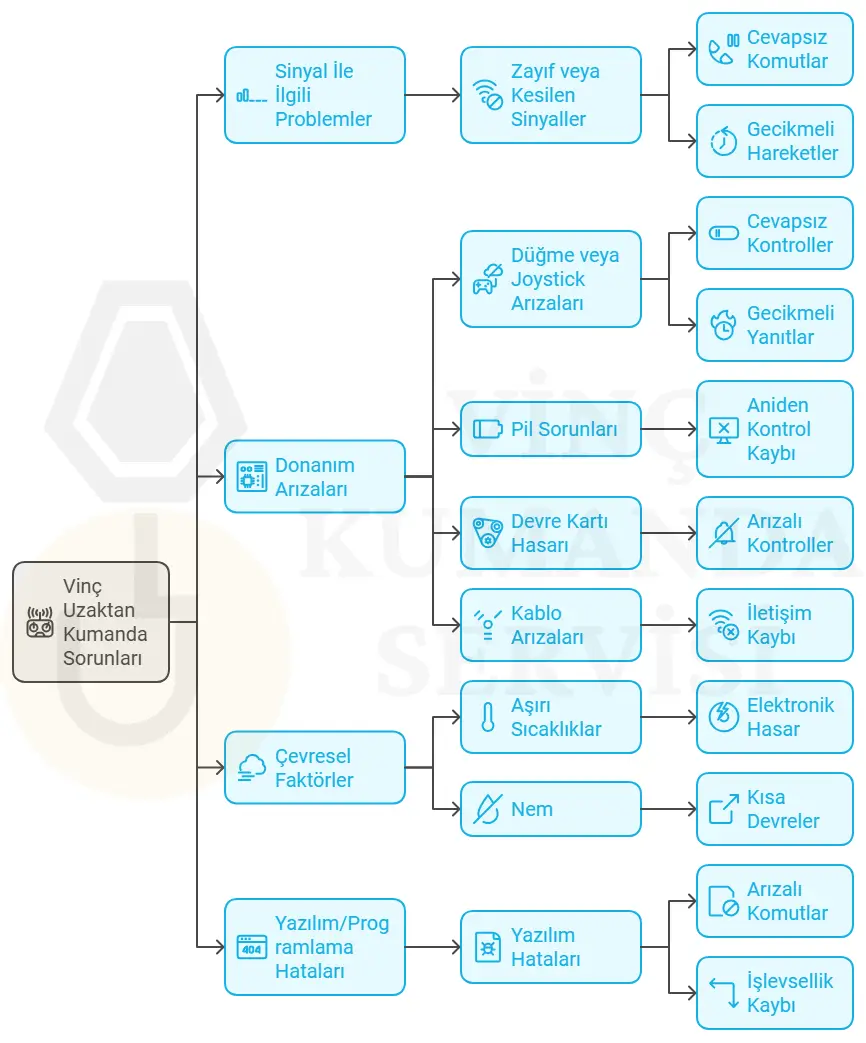
Crane remote control faults fall into eight categories: signal loss, button and joystick failure, battery problems, frequency interference, PCB damage, cable faults, environmental degradation, and software errors. Each fault type produces specific field symptoms — and each creates a different type of operational consequence, ranging from reduced control precision to complete production stoppage or, in the worst case, a safety incident. Recognising these symptoms early makes the difference between a quick, low-cost repair and a major unplanned downtime event. This guide covers every fault type with the real-world symptoms our service team observes in the field and the correct first-response action for each.
Get in Touch for All Your Requirements
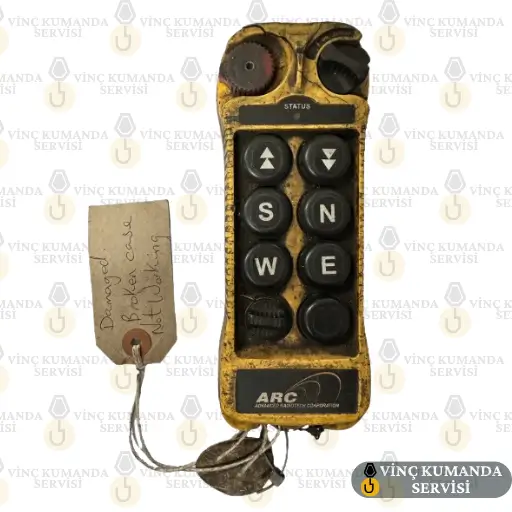
Crane Remote Control Fault Types: Quick Reference
The table below summarises all eight fault types, their primary causes, and operational impact. Each is covered in detail in the sections that follow.
| Fault Type | Primary Cause | Operational Impact |
|---|---|---|
| Signal Loss | EMI, antenna damage, range exceeded | Control loss, unsafe operation |
| Button / Joystick | Mechanical wear, moisture, dust | Missing commands, unintended movement |
| Battery Failure | Capacity loss, over-discharge | Sudden shutdown, production stop |
| Frequency Interference | Multiple wireless devices, EMI | Wrong commands, load escape risk |
| PCB Damage | Moisture, impact, overvoltage | Complete failure |
| Cable Damage | Crushing, bending, heat | Short circuit, intermittent connection |
| Environmental Factors | Dust, moisture, extreme temperature | Premature wear, contact corrosion |
| Software Error | Incorrect update, corrupted firmware | Function loss, incorrect commands |
1. Signal Loss or Weak Signal
Signal loss in wireless crane remote controls occurs when the radio frequency communication between transmitter and receiver degrades below the threshold required for reliable command transmission. Systems operating on 433 MHz or 868 MHz bands lose signal integrity when the RF path is blocked, attenuated, or disrupted by interference. As a result, the crane either stops responding or responds intermittently — creating a direct safety risk when a load is in motion.
Field Symptoms
- The crane responds to motion commands with a delay, or does not respond at all.
- Movements cut out intermittently — the crane starts, stops, starts again without a consistent pattern.
- The operator cannot predict where the load will stop, making precise placement impossible.
First-Response Action
First, check battery voltage — low battery is the most common cause of apparent signal loss. Then, move closer to the receiver and retest. If symptoms persist, inspect the receiver antenna orientation and mounting position. In facilities with welding equipment or frequency inverters nearby, the interference source may require frequency channel change or antenna relocation.
2. Button and Joystick Failures
Mechanical buttons and joysticks absorb dozens of actuations per hour in active crane operations. Under IP65-rated protection, they resist the dust and moisture that cause contact resistance degradation. However, in systems with lower IP ratings, or after extended service beyond their rated cycle life, button contacts deteriorate. As a result, a button may send the command inconsistently — working sometimes but not others — or a joystick may fail to return to centre, causing unintended crane movement.
Field Symptoms
- Crane movement in a specific direction is unreliable — the operator attempts to compensate by holding the remote at an unusual angle.
- The joystick does not return to its neutral centre position after release, resulting in continued crane movement without active operator input.
- Sudden loss of directional control — a direct safety risk when the crane is under load.
First-Response Action
Clean the button surface area with a damp cloth and retest in a dry environment. If the problem persists, the button membrane or contact mechanism requires service replacement. Do not attempt to force a stiff button or operate with a joystick that fails to self-centre — the resulting uncontrolled crane movement creates an incident risk that significantly exceeds the inconvenience of taking the remote out of service.
3. Battery Problems
Wireless crane remote controls use NiMH or Li-ion rechargeable battery systems. Both degrade progressively with charge cycles — typically after 300–500 cycles, capacity drops below the level needed to sustain a full operating shift. However, the degradation is often not noticed until the battery fails mid-operation rather than at the end of a shift, because the charge indicator still shows a high reading despite reduced actual capacity.
Field Symptoms
- The remote shuts down within minutes of a full charge, despite the indicator showing high charge level.
- The charge indicator depletes much faster than expected — reaching empty at roughly half the normal operating duration.
- If no spare battery is available, the entire operation stops until a replacement is sourced.
First-Response Action
Replace the battery pack. In the interim, source a compatible spare to restore operation. Battery replacement is an operator-level maintenance task that does not require service authorisation. However, do not attempt to open Li-ion battery packs or modify the charging circuit — both actions create safety risks and void the product certification.
4. Connection Loss and Frequency Interference
When multiple wireless devices operate on the same frequency band in proximity, electromagnetic interference (EMI) disrupts the communication between the crane remote control and its receiver. In severe cases, commands intended for one crane are received by another, or are not transmitted at all. Consequently, frequency interference is one of the most dangerous fault types — because the symptom can be an unexpected crane movement rather than a complete loss of response.
Field Symptoms
- Commands appear to cross between cranes — a forward command produces reverse movement, or an adjacent crane responds to the wrong transmitter.
- A nearby crane begins exhibiting the same erratic behaviour, suggesting shared interference source.
- The problem is worse during shift changes or peak production periods when the number of active wireless devices increases.
First-Response Action
Change the operating frequency channel on the affected transmitter-receiver pair. If the facility uses multiple crane remotes, establish a channel allocation plan that separates all active systems by at least one channel. For persistent interference from fixed sources such as welding equipment, specify FHSS (Frequency Hopping Spread Spectrum) systems — these are highly resistant to both fixed-frequency and broadband interference sources.
5. Control Circuit Board (PCB) Failures
The PCB (printed circuit board) inside the crane remote control manages all transmitter and receiver functions. Moisture ingress, physical impact, or overvoltage damage the SMD components on the board — producing failures that range from specific function loss to complete unit inoperability. Importantly, a remote control that looks undamaged externally may have significant internal board damage. As a result, PCB faults are often misdiagnosed as other fault types until the board is inspected directly.
Field Symptoms
- The remote does not power on, or the display remains dark despite a charged battery.
- Specific functions stop working entirely while others remain operational.
- An electrical smell, visible burn marks, or swollen capacitors are observable when the unit is opened by a technician.
First-Response Action
Take the unit out of service and contact the authorised service team. Do not attempt PCB-level repair without authorisation — component replacement on safety-critical boards requires factory-traceable parts and post-repair functional testing of the emergency stop and fail-safe systems. An independently repaired board that passes basic function testing may still fail the safety relay cross-monitoring checks.
6. Cable Faults in Wired Pendant Controls
In wired crane pendant controls, the cable is the component under the highest mechanical stress. Repeated coiling, crushing under crane wheels or forklift traffic, heat exposure, and continuous flexing at the entry point all cause internal conductor failure — while the outer sheath remains visually intact. Consequently, a cable that passes visual inspection can still have an internal open circuit that produces intermittent faults.
Field Symptoms
- Holding the cable in a specific position restores function — releasing it causes it to cut out again. This positional dependency is the clearest indicator of an internal conductor break.
- Heating or sparking at the cable entry gland is visible during operation.
- Fuses trip repeatedly, or the receiver board shows signs of damage consistent with a short circuit event.
First-Response Action
Take the pendant out of service immediately if sparking or repeated fuse tripping is observed — continuing to operate risks damage to the receiver board and creates a short-circuit safety hazard. Cable replacement is a service-level task; however, if the cable entry gland is the fault location, this is a common and straightforward repair for an authorised technician.
7. Environmental Degradation
Crane remote controls used outdoors or in harsh industrial environments are exposed to temperature cycles between –20°C and +55°C, high dust concentrations, and moisture. Systems with inadequate IP ratings degrade progressively under these conditions — not always in a single visible failure, but through gradual deterioration that eventually produces an unexpected fault at an operationally inconvenient moment.
Field Symptoms
- In cold conditions, the remote starts up slowly or the display freezes — internal components have moved outside their rated temperature range.
- After wet-environment use, internal contact surfaces develop corrosion that produces intermittent function loss even after the unit dries out.
- High dust concentrations — cement dust, mine dust — pack into button mechanisms and lock them in a partially actuated or stuck position.
First-Response Action
For cold-start issues, allow the remote to reach ambient temperature before attempting to operate. For dust-locked buttons, clean carefully with a damp cloth — do not use compressed air, which can force particles deeper into the mechanism. For corrosion from moisture ingress, the unit requires service inspection — corrosion on internal contacts is not visible externally and cannot be resolved through surface cleaning alone.

8. Software and Firmware Errors
Modern crane remote controls contain embedded microcontroller firmware that manages motion profiles, speed tiers, safety parameters, and transmitter-receiver pairing data. A corrupted firmware update or an incorrect parameter set can render the remote non-functional despite all hardware being physically intact. Consequently, post-update function loss is a distinct fault category that is often initially misidentified as a hardware problem.
Field Symptoms
- After a firmware update, specific functions stop working — typically related to the parameter set that was modified.
- The remote behaves as if factory-reset — pairing data is lost and the unit does not communicate with the receiver until re-paired.
- The crane responds faster or slower than expected — an incorrect speed parameter was loaded during the update.
First-Response Action
Attempt a factory reset first — this restores the default parameter set and often resolves post-update anomalies. If the fault persists, or if the incorrect speed response creates a safety risk, take the remote out of service and contact the authorised service team for firmware reinstallation. Do not continue operating a crane with an incorrectly calibrated speed response.
Conclusion: Recognise the Fault Early — Act Before It Escalates
Crane remote control faults identified early are straightforward and economical to resolve. Left unaddressed, however, the same faults escalate into production stoppages, safety incidents, and significantly higher repair costs. An operator who recognises the early symptoms of signal degradation, button wear, or battery capacity loss can schedule a repair before the fault becomes a crisis rather than responding to it after the system has failed in service. For professional diagnosis and repair, see our crane remote control repair and technical service page.
Frequently Asked Questions
Why is my crane remote control not sending a signal?
The three most common causes are low battery voltage, antenna damage, and electromagnetic interference from nearby equipment. Start by checking and replacing the battery. Then move closer to the receiver and retest. If the problem persists, inspect the receiver antenna for physical damage or poor orientation, and assess whether nearby welding or motor drive equipment is generating interference on the same frequency band.
What should I do if crane remote control buttons stop responding?
The first check is moisture or dust accumulation on the button surfaces — clean with a damp cloth and test again in a dry environment. If the problem continues, the button membrane or contact mechanism has worn beyond its service life and requires replacement. Do not attempt to force a non-responding button or continue operating with unpredictable button behaviour — the resulting uncontrolled crane movement creates a safety risk that far exceeds the inconvenience of service downtime.
How often should crane remote control batteries be replaced?
Rechargeable NiMH and Li-ion batteries typically lose significant capacity after 300–500 charge cycles — equivalent to approximately 1.5–3 years of daily use at typical charge frequencies. The practical indicator is not the cycle count, however: when the remote shuts down at less than half the expected shift duration despite being fully charged, the battery requires replacement regardless of its nominal age.
What causes frequency interference between crane remote controls?
Frequency interference occurs when multiple wireless devices — crane remotes, or high-power electromagnetic sources such as welding machines and frequency inverters — operate on the same or overlapping frequency bands in proximity. The solution is to change the channel allocation of the affected transmitter-receiver pairs, establish a facility-wide channel plan, and specify FHSS technology for new systems in high-interference environments.
Can I repair a crane remote control myself?
Battery replacement and external cleaning are operator-level tasks that do not affect the product’s certification. However, PCB repair, receiver board replacement, and firmware reinstallation require authorised service — because any modification to the safety relay circuits or control software must be verified against the original safety assessment to maintain CE and PL-d certification. An unauthorised repair that passes basic function testing may still have compromised safety relay performance that only emerges under fault conditions.
What does it mean when a crane remote control works in some positions but not others?
Positional dependency — where function returns when the cable or housing is held in a specific orientation — is the classic symptom of an internal conductor break in wired pendants, or a loose internal connection in wireless units. In wired systems, this indicates a cable fault typically located at the entry gland. In wireless units, it often indicates a cracked solder joint on the PCB caused by impact or thermal cycling. Both require service-level diagnosis.
Why did my crane remote stop working after a firmware update?
Firmware updates can corrupt pairing data, reset speed parameters to factory defaults, or — in the case of an interrupted update — leave the firmware in a partially written state that prevents normal startup. The first step is a factory reset, which restores the default parameter set. If the remote does not recover, contact the authorised service team for firmware reinstallation from a verified source file.
Is a crane remote control with an external crack safe to use?
No. A crack in the housing compromises the IP ingress protection rating immediately — even a hairline crack allows moisture and dust to enter and reach the PCB. Furthermore, a cracked housing may indicate internal impact damage to the PCB or safety relay components that is not visible externally. A cracked remote control should be taken out of service for inspection before further use, regardless of whether it appears to function normally.
Contact Vinç Kumanda Servisi
Experiencing a crane remote control fault that you cannot resolve through the first-response actions above? Contact Vinç Kumanda Servisi via WhatsApp at +90 532 546 84 62, email us at info@vinckumandaservisi.com, or visit our contact page — our service team carries out on-site and workshop diagnosis for all brands we supply.