Used Crane Remote Control: 7 Checks You Must Complete Before Buying
Buying a used wireless crane remote control is a legitimate way to control costs while maintaining operational continuity. However, a wrong purchase quickly accumulates repair costs that exceed the price of a new unit. This guide covers 7 critical checks that are frequently skipped in the used equipment market — each drawn from field experience with the faults our service team regularly encounters on second-hand units. Complete all seven checks before making a purchase decision.
Get in Touch for All Your Requirements
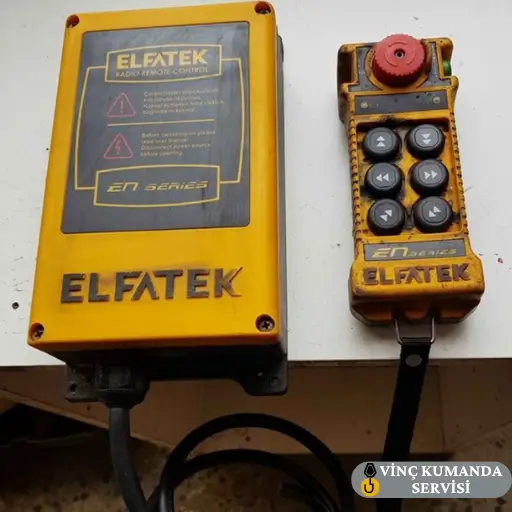
Seven Checks at a Glance
| Check | What to Look For | Red Flag |
|---|---|---|
| 1. Physical Condition | Housing, buttons, connectors | Repair marks, cracked housing, oxidised pins |
| 2. Age and Technology | Production date, frequency band | Pre-2015, 27 MHz or 40 MHz band |
| 3. Maintenance History | Service records, replaced parts | No records, non-original components |
| 4. Function Test | All motions, E-stop, signal range | E-stop >0.5 s, battery <50% rated time |
| 5. Seller Reliability | References, warranty, documentation | No warranty offer, no CE documentation |
| 6. Spare Parts and Service | Local distributor, PCB stock | No local service, discontinued model |
| 7. Price Analysis | Used + repair cost vs new TCO | Below 40% of new price with no explanation |
Check 1: Assess the Physical Condition
The external appearance of a used crane remote gives direct clues about its usage intensity. However, cosmetic damage is not the primary concern — what matters is what the external damage indicates about the internal condition. Broken buttons and cracked housing may appear to be surface problems, but the impact forces that produce this damage are transmitted directly to the internal PCB, where they can leave permanent damage invisible from outside.
What to Inspect
- Button condition: Press every button individually and confirm the return spring action. A button without tactile return feedback, or one that sticks in the pressed position, is an early fault indicator — not a cosmetic issue. In crane remote controls, a button that does not return cleanly can produce sustained unintended commands.
- Housing integrity: Cracked plastic, stripped screw threads, or a cover that does not seat correctly each void the IP protection rating — regardless of what the label states. An IP65-rated remote with a cracked housing has no ingress protection whatsoever. Inspect all housing joints and cover mating surfaces, not just the obvious impact points.
- Cables and connectors: On wired models, inspect the cable sheath along its entire length for cracks, kinking, or whitening — specifically at strain relief points and entry glands where fatigue fractures originate. Check connector pins for oxidation, corrosion, or physical deformation.
Check 2: Verify the Age and Technology Currency
Crane remote controls manufactured before 2015 frequently operate on 27 MHz or 40 MHz frequency bands that are now obsolete for industrial use. These bands carry significant interference risk in modern industrial environments with dense wireless traffic. Current systems operate on 433 MHz or 868 MHz bands with significantly more stable communication. Consequently, the production year and frequency band are the first filtering criteria — before any other evaluation is performed.
What to Verify
- Production date and model number: Photograph the label on the device and verify the model on the manufacturer’s website. Confirm the production year — not the purchase year stated by the seller, which may differ. A model that has been in storage for several years before sale may be significantly older than the seller implies.
- Frequency band: If the operating frequency is not 433 MHz or 868 MHz, expect interference problems in any industrial environment with other wireless devices, welding equipment, or VFDs. This is not a minor limitation — in electromagnetically active facilities, an older-band system will produce intermittent failures that are difficult to diagnose and impossible to resolve without a system replacement.
- Operating environment history: A crane remote used in a quarry, foundry, or chemical plant has been subjected to significantly more aggressive conditions than the same-age unit from a warehouse or office application. The operating environment history matters as much as the age — always ask where the unit was previously deployed.
Check 3: Investigate the Maintenance History
A used crane remote with a documented maintenance history is significantly more reliable than one without — even if the maintained unit is older. However, the absence of maintenance records is itself a data point: it almost certainly means no maintenance was performed. Ask the seller for service receipts, replaced parts lists, or authorised service documentation. If these cannot be provided, use this as a negotiating argument on price rather than accepting the asking price without supporting documentation.
Questions to Ask the Seller
- Which components were replaced? A seller may not volunteer that the PCB, receiver module, or charge circuit has been replaced with non-original components. If any of these three components has been substituted, performance becomes unpredictable — these are the components that define the safety and communication architecture of the system.
- When was the last service? A service interval of more than two years without documentation indicates the unit has been running without periodic inspection — which means developing faults such as connector oxidation, capacitor degradation, and antenna loosening have not been caught and corrected.
- Storage conditions: A crane remote stored outdoors or in a damp warehouse between deployments carries internal oxidation risk that is not visible during inspection. Ask specifically about storage conditions during any period when the unit was not in active use.
Check 4: Complete a Full Function Test Before Purchase
A function test is the single most important step in any used crane remote purchase. The test must be performed with the unit paired to its receiver and connected to an actual crane — not just powered on at a bench. “It works” is not sufficient — emergency stop response, full-load command response time, and signal loss behaviour must all be specifically tested. Do not accept a unit that has not been tested under all these conditions.
Function Test Checklist
- All motion buttons: Test hoist up, hoist down, bridge travel in both directions, and trolley travel in both directions individually. Each command must produce the correct crane motion without delay or vibration. A command that produces the wrong direction of motion indicates a phase connection or receiver configuration issue.
- Signal range: Test at the maximum expected operating distance — not just at close range. A unit that works at 5 metres may fail at 30 metres due to reduced RF output power from a degraded transmitter PCB or a depleted battery. Test at the actual operating distance before accepting the unit.
- Emergency stop response time: Activate the E-stop button and measure the time to complete crane arrest. The crane must stop within 0.5 seconds. If the response time exceeds this, the receiver module has a fault — do not accept the unit. The emergency stop function is the primary safety protection for the crane operator, not a secondary feature.
- Battery operating time: Start with a fully charged battery and measure the actual operating duration under normal use conditions. If the measured time is below 50% of the manufacturer’s rated figure, the battery requires immediate replacement — factor this cost into the purchase price negotiation.
Check 5: Assess Seller Reliability
In the used equipment market, it is possible to conceal an item’s history almost entirely. Consequently, information about the seller is as valuable as information about the product. Used crane remote controls sourced through authorised service centres or established distributors carry significantly less risk than units from individual sellers — because these channels perform technical checks before releasing equipment for sale.
Seller Selection Criteria
- References and track record: Ask for references from other companies that have purchased from the same seller. Specifically ask about the condition of units received versus what was described, and whether any faults appeared shortly after purchase that were not disclosed.
- Warranty offer: Avoid sellers who cannot offer a minimum 3-month operational warranty. A seller who will not stand behind the product for 3 months does not have confidence in the unit they are selling — which is a clear signal about what they know that they are not disclosing.
- Invoice and documentation: Request the CE declaration, original user manual, and purchase invoice. These documents are critical for future repair processes — a service team cannot verify the system’s certification status or provide authorised spare parts without knowing the unit’s authenticated identity and provenance.
Check 6: Verify Spare Parts Availability and Technical Support
The most frequently overlooked risk in used crane remote purchases is becoming dependent on a model without available spare parts. A discontinued model or one without a local distributor effectively reaches the end of its economic life at the moment of first fault — because the repair path does not exist. Before purchasing, confirm the specific model’s local service network and stock status. For a professional pre-purchase technical assessment, contact the service team with the brand and model information before committing to a purchase.
Pre-Purchase Verification Checklist
- Local distributor or service network: Is there an authorised service provider for this brand locally? Without one, spare part lead times of several months are common — during which the crane remains out of service and production is affected.
- PCB and receiver module stock: These are the two most frequently failing components in crane remote controls. Ask specifically whether they are held in local stock for the specific model — not whether they are “available.” A component that must be sourced internationally adds both time and cost to any repair.
- Battery compatibility: Models using non-standard or proprietary battery formats create long-term operational vulnerability. Confirm the battery type and whether replacement batteries are available locally from multiple suppliers — not just from the original distributor. For our complete repair and technical service offering, see our crane remote control repair and technical service page.
Check 7: Perform a Realistic Price Analysis
The apparent cost advantage of a used crane remote can be misleading. The correct comparison is: used purchase price plus estimated maintenance and repair cost over 2–3 years, versus the total cost of ownership of a new equivalent unit over the same period. If this calculation does not favour the used option, buying new is the more rational choice. For a detailed TCO methodology, see our crane remote control repair cost guide.
| Comparison Criterion | Used Unit | New Unit |
|---|---|---|
| Purchase price | Low | High |
| Warranty period | None or short | 1–2 years |
| Unexpected repair risk | High | Low |
| Spare parts certainty | Variable | Distributor-guaranteed |
| 2–3 year total cost | Variable — often higher | Predictable |
As a practical price reference: a used crane remote offered at below 40% of the current new unit price — without a clear explanation — typically signals either that the model is significantly outdated, or that a serious fault is being concealed. A reasonable used price range is 50–75% of the equivalent new unit price. Below this range, the risk profile shifts substantially toward the buyer.
Conclusion: The Real Saving in Used Equipment Purchasing Is Making an Informed Decision
A correct used crane remote control purchase decision requires completing all seven checks — physical condition, technology verification, maintenance history, comprehensive function testing, seller reliability, spare parts and service network confirmation, and realistic total cost analysis. Skipping any of these steps transfers a risk to the buyer that the seller has already priced into the discount. If you want a professional technical assessment of a unit you are considering — or a current condition evaluation of your existing crane remote — contact the Vinç Kumanda Servisi team with the brand and model information before committing to a purchase.
Frequently Asked Questions
Is buying a used crane remote control safe?
A used crane remote can be used safely when physical condition, function testing, and maintenance history have all been verified. However, emergency stop and signal reliability tests must not be skipped — these two functions directly affect operator safety and cannot be assumed to be functional from visual inspection alone. A unit that passes all seven checks in this guide is a viable safe purchase; one that cannot be fully tested should be declined regardless of price.
Which parts fail most frequently in used crane remote controls?
The PCB, receiver module, and battery are the three most frequently failing components. Confirm spare parts availability for all three before purchase — specifically whether they are held in local stock for the exact model. A unit where any of these three components requires international sourcing represents a significant operational risk, because a failure produces an extended crane stoppage rather than a same-day repair.
How low should the price be for a used crane remote control?
A reasonable used crane remote price range is 50–75% of the equivalent new unit price. Offers below 40% of new price — without a clear explanation — typically indicate either a significantly outdated model or a concealed fault. At these price levels, the TCO calculation almost always favours buying new, because the repair risk probability at below-40% pricing is too high to justify the initial saving.
Can an older crane remote control work with a new crane?
Each crane remote is programmed by the manufacturer to work with specific receiver models. Cross-generational incompatibility between transmitter and receiver appears during installation and may require additional programming or receiver replacement. Before purchasing a used remote for a different crane than its original application, verify the compatibility list with the manufacturer or authorised service team — this must be confirmed before purchase, not discovered during installation.
Can a used crane remote control without CE documentation be used?
CE documentation confirms that the remote was manufactured to comply with EU directives. A unit without CE documentation — or one where the documentation has been lost — creates problems during OHS inspections and increases legal liability in the event of a workplace incident. Request the CE declaration; if the seller cannot provide it, treat this as a red flag. The absence of documentation may mean the unit was not CE certified at manufacture, not merely that the paperwork has been misplaced.
What does internal moisture damage look like in a used crane remote?
Internal moisture damage typically appears as greenish or white oxidation on connector pins, PCB component leads, and relay contact surfaces. However, it is often not visible without opening the unit — and opening it during a purchase inspection is not always possible. The external indicators are: a unit that works intermittently rather than reliably, a unit with visible rust staining around housing seams or screw holes, and a unit with connector pins that show surface discolouration. If any of these are present, assume internal moisture damage until proven otherwise by a service team inspection.
Contact Vinç Kumanda Servisi
Considering a used crane remote control purchase and need a professional technical assessment before committing? Contact Vinç Kumanda Servisi via WhatsApp at +90 532 546 84 62, email us at info@vinckumandaservisi.com, or visit our contact page. Provide the brand and model — we can advise on spare parts availability, compatibility, and whether the asking price reflects the unit’s actual condition.