Crane Remote Control Setup: 5-Step Installation Guide for Safe and Reliable Operation
An incorrectly installed crane remote control creates a wide range of problems — from signal delay and command inversion to emergency stop failure. The five steps covered in this guide are: correct system type selection, receiver mounting position, power supply and earthing connections, commissioning tests and calibration, and preventive maintenance planning. Applying all five steps in sequence — and in full — directly determines both operational safety and the service life of the installed system.
Get in Touch for All Your Requirements
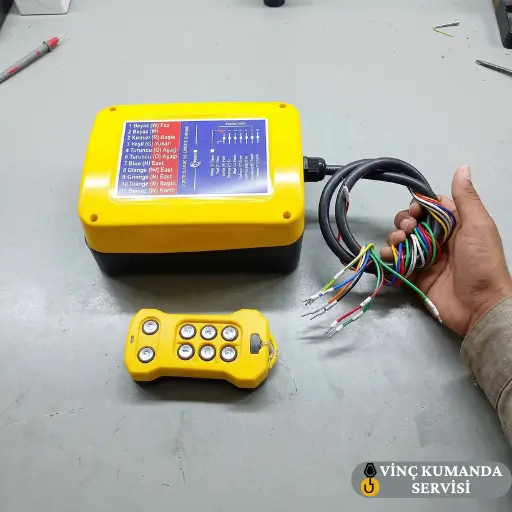
Setup Checklist: Five Steps at a Glance
The table below summarises all five setup steps, the key verification point for each, and when in the installation process each applies. Each step is covered in detail in the sections that follow.
| Step | Key Verification Point | When |
|---|---|---|
| 1. System Type Selection | IP class, frequency, operating range | Before installation |
| 2. Receiver Mounting Location | 15+ cm from metal surfaces, clear sightline | Before installation |
| 3. Power Supply and Wiring | Voltage verification, earthing, E-stop circuit | During installation |
| 4. Testing and Calibration | E-stop ≤ 0.5 s, staged load test to 100% | Commissioning |
| 5. Preventive Maintenance Plan | Weekly to annual inspection schedule | Ongoing |
Step 1: Select the Correct System Type
The most consequential decision before installation begins is system type. A correctly specified system that is installed incorrectly will fail — but an incorrectly specified system will fail regardless of how well it is installed. However, this decision is frequently reduced to price comparison rather than technical parameter matching, which is the single most common source of premature crane remote failure in the field.
Wired vs Wireless: The Four Deciding Criteria
- Operating range: Wireless is mandatory for any application where the operator needs to work more than 20 metres from the crane body. Wired pendants constrain the operator to the cable length — which in large-span cranes means the operator cannot follow crane travel or maintain load sightlines.
- Electromagnetic environment: In facilities with welding machines, generators, and VFDs, specify 433 MHz or 868 MHz band wireless systems with FHSS technology. FHSS automatically hops to interference-free channels — fixed-frequency systems in high-EMI environments will experience command delays and dropouts regardless of other specifications.
- IP protection class: Minimum IP65 for outdoor sites and humid environments; IP67 for dust-intensive applications. Specifying below the actual environmental requirement produces the most common early-failure pattern our service team encounters. For detailed IP selection guidance, see our crane remote control selection criteria guide.
- Operator mobility requirement: In any application where the operator must track load movement — placing loads onto fixtures, threading through clearances — wireless control is the correct specification for both efficiency and safety reasons.
Step 2: Select the Correct Receiver Mounting Location
The receiver mounting position directly determines signal quality and long-term reliability. However, the fastest and most accessible mounting point is frequently not the correct one. Metal surfaces, direct environmental exposure, and poor maintenance access all create problems that compound over the system’s operational life. Furthermore, a receiver mounted in a technically correct position on day one but subjected to progressive vibration loosening of its connections will produce intermittent faults months later that are traced back to the original mounting decision.
Antenna Clearance and Signal Optimisation
Mount the receiver unit with the antenna at a minimum of 15–20 cm clearance from any metal surface. Metal surfaces reflect radio signals, creating multipath interference and potential dead zones at fixed locations within the facility. Specifically, the antenna should be oriented vertically — pointing downward toward the operating area rather than parallel to a structural member — and positioned to face the area where the operator will typically be standing.
Mounting Location Checklist
- Operator access: The control panel and receiver must be at a height and position accessible to one person without specialist equipment. Receivers mounted in difficult-access locations accumulate avoidable time and cost on every service visit over the system’s life.
- Operator sightline: The operator must be able to see the load and all crane movements at all times during operation. Consequently, the mounting point must not constrain the operator to a position where sightlines are blocked.
- Cable routing (wired systems): Route cables through protective conduits; cables must not contact the floor. Specifically, cables that cross traffic areas must be protected from forklift and equipment traffic — the most common source of cable damage in wired pendant systems.
- Environmental exposure: The receiver must not be in direct rain exposure, dust accumulation zones, or within 30 cm of sustained heat sources. Where environmental protection is inadequate, use a protective enclosure rated for the local IP requirement.
Step 3: Power Supply and Wiring Connections
Connection errors account for more than 40% of crane remote control faults. However, most of these faults do not produce an immediate failure at installation — they produce intermittent or progressive faults that appear days or weeks later, at which point the connection error is difficult to trace. The verification steps below must be completed during installation, not assumed to be correct.
Supply Voltage Verification
Measure the supply voltage at the receiver input terminals with a multimeter and compare to the value in the technical specification — typically 24V DC or 110/220V AC depending on the system. A supply voltage outside the rated tolerance range damages the receiver PCB — not always immediately, but progressively through thermal stress on voltage regulation components. Do not assume the supply voltage is correct from the panel label alone.
Earthing and Phase Connections
- Earthing: Verify the earthing connection is complete and the earth path resistance is below 1 Ω per IEC 60204-32. Inadequate earthing is the cause of intermittent self-activation and command delay — symptoms that are consistently misdiagnosed as interference until the earth path is measured. Earthing verification must be the first electrical check on every installation.
- Phase connections: Incorrect phase connection produces reversed crane movement — a direction command produces the opposite motion. This is one of the more subtle connection errors because the system appears to function normally in all other respects. Verify correct phase connection by performing an unloaded motion test in each direction immediately after first power-on.
- Cable cross-section: For wired systems, the cable conductor cross-section must be sufficient to carry the load current without resistive voltage drop. An under-rated cable cross-section causes heating and signal degradation — symptoms that worsen as the cable heats up during operation and improve after it cools, which makes diagnosis more difficult.
- E-stop circuit independence: The emergency stop circuit must be connected to an independent safety rail that is separate from the main control circuit. Consequently, an E-stop activation must arrest crane motion regardless of the state of any other control circuit component. Do not route the E-stop circuit through the main controller logic.
Step 4: Testing and Calibration Protocol
Post-installation testing is not an optional confirmation step — it is a mandatory part of the commissioning process. All motion directions must be tested unloaded first, then at 25%, 50%, and 100% of rated load capacity in stages. Skipping the staged approach and proceeding directly to full-load testing amplifies any undetected installation error into a mechanical damage event. For dual-speed systems specifically, missing calibration creates an abrupt transition between speed modes that produces dangerous load swing under actual operating conditions.
Test Protocol: Apply in Sequence
- No-load function test: Run all motion directions — up, down, left, right, forward, back — without load. Confirm each produces the correct direction of movement. Specifically, verify that releasing each command button produces an immediate crane arrest — any continued creep after button release indicates a calibration or relay issue that must be resolved before load testing.
- E-stop response time test: Activate the emergency stop button and measure the time from button activation to complete crane arrest. The system must arrest within 0.5 seconds — measure with a timing instrument, not by hand-feel. Furthermore, test the signal-loss fail-safe response: remove the transmitter battery mid-motion and confirm the crane arrests automatically without operator action.
- Signal range test: For wireless systems, move to the maximum expected operating distance and confirm reliable command response in all directions. Do this test from multiple positions — including positions partially behind structural members — to identify any dead zones before the system goes into service.
- Staged load test: Apply 25% of nominal load first. Run all motion functions and observe for smooth acceleration, deceleration, and positioning. Then progress to 50% and 100% nominal load, confirming smooth operation at each stage. Specifically, listen for contactor chattering, mechanical vibration, or unusual motor noise — any of these at load indicates a problem not present under no-load conditions.
- Speed transition calibration: For dual-speed systems, adjust the slow/fast transition threshold per the manufacturer’s technical manual. The slow speed should deliver 30–50% of nominal speed — below 30% provides inadequate positioning precision, while above 50% makes the transition between modes insufficiently distinct for precision work. This calibration must be performed by a qualified technician.
Step 5: Establish a Preventive Maintenance Schedule
A correctly installed crane remote control degrades without maintenance — however, the rate of degradation is predictable and therefore preventable. In wired systems, cable wear is the primary degradation mechanism. In wireless systems, receiver antenna connection loosening and battery capacity loss are the most common. Furthermore, the vast majority of unplanned crane remote failures that our service team investigates can be traced back to a maintenance interval that was overdue when the fault occurred.
Recommended Maintenance Intervals
- Weekly: Activate all buttons and switches to verify mechanical response. Repeat the E-stop test — do not assume it passes because it passed last week. Specifically, an E-stop contact that was clean and fast last week can develop oxidation or a contamination event this week.
- Monthly: Visual inspection for cable damage, connection corrosion, and housing cracks. Specifically check cable entry glands and strain relief points on wired systems — these are the locations where cable fatigue most commonly produces internal conductor breaks that appear as intermittent faults.
- Every 3 months: Clean the receiver unit and transmitter housing. Inspect IP protection seals for cracking, compression set, or contamination. A seal that has lost its compression — which is not always visible without removing the housing — provides no ingress protection even though the IP rating label still shows on the unit.
- Annually: Full periodic service per manufacturer specifications — calibration check, battery capacity measurement, and safety relay function test. These annual tests confirm that the safety architecture established at commissioning remains intact over the operational year.
For a full guide to recognising developing faults before they produce complete failure, see our crane remote control fault signs guide.
Conclusion: What Happens When a Step Is Skipped
Correct crane remote control setup completes in five stages: environment-matched system selection, correctly positioned receiver mounting, verified voltage and earthing connections, staged load testing with calibration, and a documented maintenance schedule. When any of these stages is skipped, the resulting problem is usually attributed to the remote control itself — but in most cases the root cause is the installation decision, not the product. For professional installation and commissioning services including load testing and documentation, see our crane remote control installation service.
Frequently Asked Questions
How long does crane remote control installation take?
A standard wireless crane remote control installation — including site preparation, electrical connection, pairing, no-load testing, and staged load commissioning — takes 2–4 hours on a crane with accessible wiring and a clean electrical panel. However, installations that require removing an existing system, replacing crane panel wiring, or resolving earthing deficiencies take 6–8 hours or more. The commissioning test sequence cannot be shortened — each load stage must be observed before proceeding to the next.
Can I install a crane remote control system myself?
Power supply connections, earthing verification, and calibration all require technical knowledge and instrumentation. Incorrect wiring — specifically incorrect phase connection or an incorrectly earthed circuit — can damage not only the remote control but also the crane motor and control panel. Consequently, installation by an authorised service team is strongly recommended. DIY installation that passes initial testing may still have latent wiring errors that produce faults months later under loaded operating conditions.
What should I do if the crane remote does not send a signal after installation?
First, verify that the transmitter and receiver are paired on the same frequency channel — this is the most common cause of complete non-response immediately after installation. Then measure the supply voltage at the receiver input terminals. If voltage is correct and pairing is confirmed, check the earthing connection and verify the receiver antenna has at least 15 cm clearance from any metal surface. A receiver mounted too close to the crane structure can produce complete signal loss that looks identical to a pairing fault.
Which IP protection class is sufficient for a crane remote control?
IP54 is adequate for closed, dry factory environments with minimal contamination. IP65 is the minimum for outdoor sites, humid environments, and any installation with spray or dust exposure. IP67 is required for dust-intensive applications — mining, cement production, quarrying — and wash-down areas. Never specify below the actual environmental requirement: a single service call from premature IP-related failure costs more than the price difference between the correct and incorrect IP rating.
When should crane remote control calibration be renewed?
Annual calibration review is the standard recommendation per manufacturer guidelines. However, recalibration is additionally required: when load capacity changes; after remote control replacement; and when abnormal operating behaviour is observed — specifically command delay, creep motion after button release, or vibration during motion transitions. These symptoms indicate that the calibration parameters have drifted from the commissioning baseline and require re-verification against the original settings.
Why does the crane move in the wrong direction after installation?
Reversed crane movement after installation is caused by incorrect phase connection. Swapping two phase conductors in the power supply to the crane motor reverses the motor’s rotation direction — which reverses the corresponding crane motion. This is resolved by correcting the phase wiring, not by reconfiguring the remote control parameters. The no-load function test in Step 4 is specifically designed to detect this error before any load is applied to the crane.
What is the minimum E-stop response time for an industrial crane remote control?
The emergency stop must arrest all crane motion within 0.5 seconds of button activation for standard industrial crane applications — this is the criterion stated in most manufacturer technical specifications and is the field standard our service team uses for commissioning acceptance. However, the exact maximum response time must be confirmed against the specific system’s technical documentation. Measure with a timing instrument during commissioning and record the result as the baseline for future comparison during annual service checks.
Contact Vinç Kumanda Servisi
Need professional crane remote control installation, commissioning, or calibration support? Contact Vinç Kumanda Servisi via WhatsApp at +90 532 546 84 62, email us at info@vinckumandaservisi.com, or visit our contact page for a tailored quote.